Web application security

Get custom-built, hands-on web exploitation and application security training, with practical, measurable results built for real-world defense.

Book a 30m. strategy call to discuss your training and hiring needs.

Built on
Cyber Helmets’ field-tested
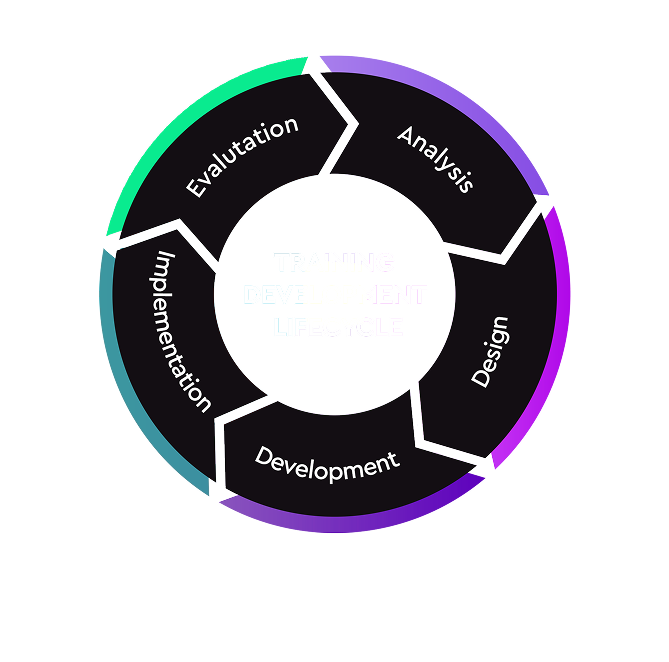
Training Development Process

Built on
Cyber Helmets’ field-tested
Training Development Process

Tailored. Measurable. Effective.

All our trainings are delivered through Cyber Helmets’ Training Development Process (TDP), a framework designed to ensure every training is tailored, measurable, and directly aligned with your business needs.

From initial consultation and needs assessment to real-time feedback and ongoing support, this process guarantees that your team doesn’t just learn, they apply new skills effectively in your environment.

Built with world-class platforms:

This training is delivered through custom-build content, designed and guided by Cyber Helmets, enriched with Hack The Box Academy’s sophisticated labs and curated content.

Build capability across high-level enterprise domains, while translating that into concrete focus areas your teams can apply immediately.

Master real-world exploitation skills

Across web apps and APIs, including OWASP Top 10, authentication flaws, and logic vulnerabilities, with bug bounty hunting methodologies built in.

Get measurable results

Through custom-built content, expert-led guidance, and immediate feedback that translates directly into stronger application security.


Enterprise Skill Domains
> Web Exploitation & API Security
> Vulnerability Analysis & Exploitation
> Secure Report Writing & Remediation

> Reconnaissance & Information Gathering

Key Focus Areas

Want your team to get certified?

Get the official Hack The Box certifications with us.

Transform your team’s capabilities
Book a 30m. strategy call to discuss your training and hiring needs.

Syllabus:

Intro to GCP

  • GCP Hierarchy
  • Google Workspace
  • gcloud config
  • Basic Hacking Techniques

Exploitation of GCP Services

  • IAM
  • KMS
  • Secrets 
  • Storage
  • Compute Instances & VPC
  • Cloud Functions
  • CloudSQL
  • Pub/Sub
  • App Engine
  • Google APIs
  • Cloud Shell

Methodologies

  • White box

Security Services

  • GCP Logging & Monitoring

Syllabus:

Intro to AWS

  • AWS Organization
  • AWS Principals
  • Basic Hacking Techniques

Exploitation of AWS Services

  • IAM
  • STS
  • KMS
  • Secrets Manager
  • S3
  • EC2 & VPC
  • Lambda
  • RDS
  • SQS
  • SNS

Methologies

  • White box

Common Detection Mechanisms

  • CloudTrail

Syllabus:

Azure Basics

  • Azure Organization
  • Entra ID
  • Azure Tokens & APIs
  • Basic Enumeration Tools


Exploitation of Azure Services

  • Entra ID IAM
  • Azure IAM
  • Azure Applications
  • Azure Key Vault
  • Azure Virtual Machine & Networking
  • Storage Accounts
  • Azure File Share
  • Azure Table Storage
  • Azure SQL Database
  • Azure MySQL & PostgreSQL
  • Azure CosmosDB
  • Azure App Service
  • Basic Azure Research Technique
  • Azure Function Apps
  • Static Web Apps
  • Azure Container Registry
  • Azure Container
  • Instances, Apps & Jobs
  • Azure Queue
  • Azure Service Bus
  • Azure Automation Account
  • Azure Logic Apps
  • Azure Cloud Shell
  • Azure Virtual Desktop


Methologies

  • White box
  • Black box
  • Pivoting between Entra ID & AD


Common Detection Mechanisms

  • Azure & Entra ID Logging & Monitoring
  • Microsoft Sentinel
  • Microsoft Defender for Cloud & Microsoft Defender EASM

Fundamentals and Setup

  1. Overview of Android’s architecture and ecosystem dynamics.
  2. Exploration of security features native to Android using Java, Kotlin, C++, and Rust.
  3. Mobile Application Threat Model
    a) Differences between mobile and web application threat models.
    b) Applying threat modeling techniques specifically to mobile applications.
    c) Case studies highlighting potential threats and vulnerabilities.
    d) How do we secure and test cross platform apps (e.g. ReactNative, Xamarin, etc).
  4. Introduction to industry mobile security standards
    a) OWASP Mobile Application Security (MAS) project
    b) Effective usage of the Mobile Application Security Verification Standard (MASVS).
    c) Effective usage of the Mobile Security Testing Guide (MSTG).
    d) Overview of the OWASP top 10 for mobile.
  5. Setting up and preparing a mobile security testing lab
    a) Configuration of industry-standard tools and guidance on their appropriate use.
    b) Setup of virtual mobile devices using Corellium, including its advantages.
    c) Introductory exercises to familiarize with the tools.
  6. Secure Coding Overview
    a) Exercises to identify vulnerabilities in code examples
    b) Discussion of the appropriate mechanisms for remediation
    c) Practical session on remediation and re-testing the app
  7. Secure storage
    a) Overview of application storage mechanisms.
    b) Introduction to cryptographic storage solutions on Android.

Advanced Techniques and Practical Application

  • Mobile penetration testing methodology
    a) Methodologies used in real-world scenarios with practical tips and tricks.
  • Identifying issues with backend APIs
    a) Examination of client-side trust issues.
    b) Analysis of insecure communications including certificate validation and pinning.
  • Cryptography in Android apps
    a) Utilization of Android’s Crypto APIs.
    b) Implementation of native cryptography using libraries like libnacl and OpenSSL.
    c) Management of cryptographic keys.
  • Authentication and Authorization
    a) Testing client-side authentication mechanisms, including secure usage of biometrics.
    b) Strategies to detect and bypass authentication flaws.
    c) Security measures for API authentication.
  • Android IPC
    a) Detailed exploration of Intents, deep links, Binders/services, and broadcast receivers.
  • Webviews
    a) Identifying and resolving common security issues in Android Webview configurations.
  • Software Composition Analysis (SBOM)
    a) Techniques to determine the components of an Android app.
    b) Identifying known vulnerabilities within these components.
  • Mobile Device Management (MDM)
    a) Introduction to Mobile Device Management: definition, core features, and its role in enhancing organizational security.
    b) Discussion on the benefits and practical applications of MDM in controlling and securing mobile devices across an enterprise.
  • Mobile Application Management (MAM)
    a) Overview of Mobile Application Management: what it entails and its significance in enterprise environments.
    b) Exploration of how MAM contributes to managing and securing applications specifically, detailing its utility for enterprise security strategies.

Advanced Techniques and Practical Application

  • Mobile penetration testing methodology
    a) Methodologies used in real-world scenarios with practical tips and tricks.
  • Identifying issues with backend APIs
    a) Examination of client-side trust issues.
    b) Analysis of insecure communications including App Transport Security issues & certificate pinning.
  • Cryptography in IOS apps
    a) Utilization of iOS’s CryptoKit & CommonCrypto APIs.
    b) Implementation of native cryptography using libraries like libnacl and OpenSSL.
    c) Management of cryptographic keys and leveraging the secure enclave.
  • Authentication and Authorization
    a) Testing client-side authentication mechanisms, including secure usage of Local Authentication (biometrics).
    b) Strategies to detect and bypass authentication flaws.
    c) Security measures for API authentication.
    d) Using Device Check and App Attest
  • iOS IPC
    a) Detailed exploration of URL schemes, deep (universal) links, and extensions.
  • Webviews
    a) Identifying and resolving common security issues in iOS Webview configurations.
  • Software Composition Analysis (SBOM)
    a) Techniques to determine the components of an iOS app.
    b) Identifying known vulnerabilities within these components.
  • Implementing App Integrity
    a) What to look for
    b) How to implement
  • Mobile Device Management (MDM)
    a) Introduction to Mobile Device Management: definition, core features, and its role in enhancing organizational security.
    b) Discussion on the benefits and practical applications of MDM in controlling and securing mobile devices across an enterprise.
  • Mobile Application Management (MAM)
    a) Overview of Mobile Application Management: what it entails and its significance in enterprise environments.
    b) Exploration of how MAM contributes to managing and securing applications specifically, detailing its utility for enterprise security strategies.

Fundamentals & Setup

  1. Overview of iOS’s architecture and ecosystem dynamics.
  2. Exploration of security features native to to iOS using Objective-C, Swift, and C(++).
  3. Mobile Application Threat Model
    a) Differences between mobile and web application threat models.
    b) Applying threat modeling techniques specifically to mobile applications.
    c) Case studies highlighting potential threats and vulnerabilities.
    d) How do we secure and test cross platform apps (e.g. ReactNative, Xamarin, etc).
  4. Introduction to industry mobile security standards
    a) OWASP Mobile Application Security (MAS) project
    b) Effective usage of the Mobile Application Security Verification Standard (MASVS).
    c) Effective usage of the Mobile Security Testing Guide (MSTG).
    d) Overview of the OWASP top 10 for mobile.
  5. Setting up and preparing a mobile security testing lab
    a) Configuration of industry-standard tools and guidance on their appropriate use.
    b) Setup of virtual mobile devices using Corellium, including its advantages.
    c) Introductory exercises to familiarize with the tools.
  6. Secure Coding Overview
    a) Exercises to identify vulnerabilities in iOS code examples
    b) Discussion of the appropriate mechanisms for remediation
    c) Practical session on remediation and re-testing the app
  7. Secure storage
    a) Overview of application storage mechanisms.
    b) Introduction to cryptographic storage solutions on iOS.